Olares 1.12.4 is now available. This release focuses on improving everyday usability while strengthening overall system reliability.
For a full list of changes, check out our detailed release notes.
What is Olares?
Olares is an open-source personal cloud operating system designed to empower users with local AI capabilities and private, self-hosted services. It allows you to transform your hardware into a powerful AI personal cloud for running cutting-edge AI models, managing personal data, automating your home, and hosting decentralized apps.
What’s new in 1.12.4?
Improved Windows local connectivity
On Windows, local access is now easier to set up. LarePass can automatically configure local domain access via the hosts file, reducing manual steps and making it simpler to reach your Olares services locally.
Thanks to community feedback, we’re continuing to refine the Windows local access experience over time.
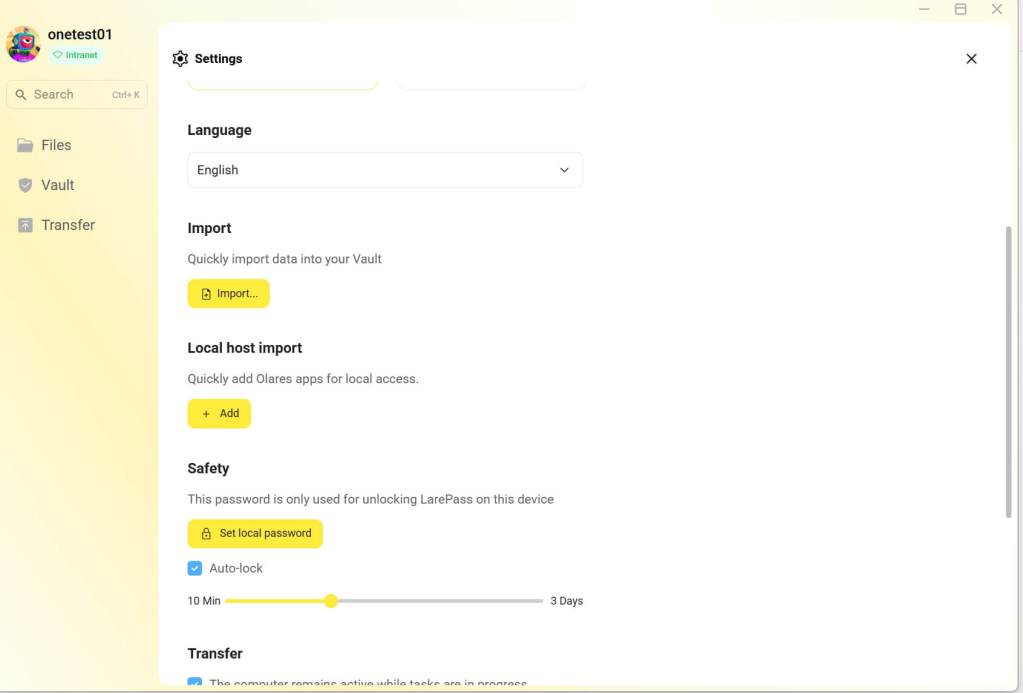
Easier local access on Windows
Refinements across daily workflows
Olares 1.12.4 introduces several refinements to day-to-day workflows:
-
Smoother CLI/Admin workflows: The command-line and administrative experience is improved for users on WSL and those using
sudo. -
Faster search: Search updates are now faster in multi-node setups, with cleaner highlighting for results.
-
More reliable file operations: File uploads and copy operations are more dependable, thanks to improved pre-checks and clearer error messages.
Clearer login and connectivity
Based on community feedback, we’ve refined UX copy and error messages to make login and connectivity failures clearer and easier to resolve. Missing or invalid tokens are now handled more gracefully, reducing intermittent connection issues during login and access.
New apps on shelf
Since the last release, the following applications have been added to the Market and are available for one-click installation:
-
Bluesky PDS: A self-hosted server for the Bluesky social network. It allows you to run your own Personal Data Server, giving you full control over your social media data and identity.
-
Jackett: A proxy server that translates app searches into tracker-specific HTTP queries, parses the HTML/JSON responses, and returns results to the requesting application.
-
SillyTavern: A locally installed UI for interacting with text-generation LLMs, image-generation engines, and text-to-speech (TTS) voice models.
How to update to 1.12.4
From v1.12, system updates are managed on LarePass. Follow these simple steps:
Important
Upgrade your LarePass to the latest version (1.7.9) from your app store first.
-
Open the LarePass app, and navigate to Settings > System > System update.
-
Verify that a new version is available and tap Upgrade.
-
Choose an upgrade method and tap Confirm.
-
When prompted, tap Continue to start installation. Olares will restart automatically after the update finishes.
-
After upgrading, you must restart all AI applications that use the GPU to ensure they function correctly.
What’s next?
Your support and feedback inspire everything we build. We’re actively working on exciting updates and improvements, and we can’t wait to share the next version with you. Big things are ahead!
Jump into GitHub Discussion or Discord to share your ideas and help shape the future of Olares